A C++ Qt graphical user interface for generating music using acestep.cpp
 6db87d119d
- Languages from the full list of "50+" have been added - Backward compatible with original en/zh/ja |
||
|---|---|---|
| .github/workflows | ||
| res | ||
| src | ||
| .copywrite.hcl | ||
| CMakeLists.txt | ||
| LICENSE | ||
| README.md | ||
Aceradio
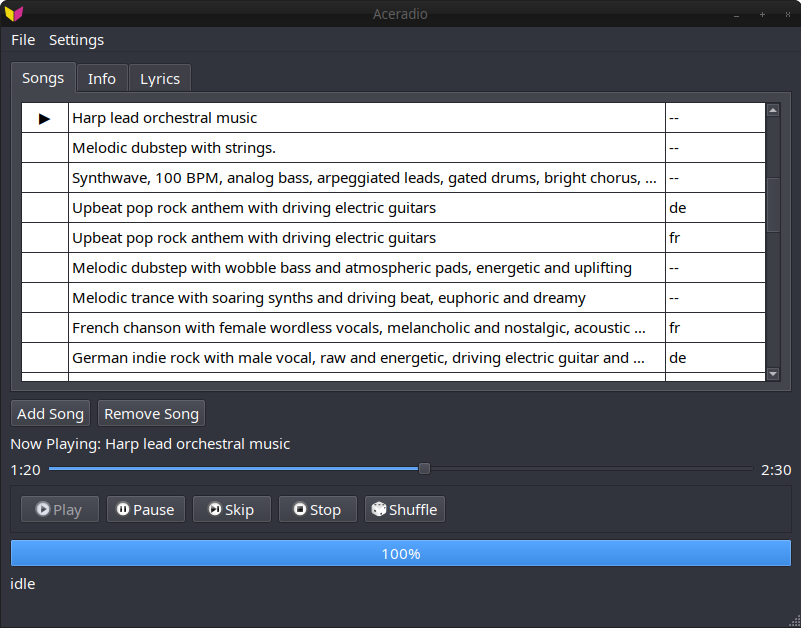
A C++ Qt graphical user interface for generating music using acestep.cpp.
Requirements
- Qt 6 Core, Gui, Widgets, and Multimedia
- CMake 3.14+
- acestep.cpp (bring your own binaries)
Installing
- Grab the latest release from https://github.com/IMbackK/aceradio/releases/
- For now you will have to provide acestep.cpp binaries, these can be optained by following the instructions at https://github.com/ServeurpersoCom/acestep.cpp or the Build acestep.cpp section below
Build acestep.cpp:
git clone https://github.com/ServeurpersoCom/acestep.cpp.git
cd acestep.cpp
mkdir build && cd build
cmake .. -DGGML_VULKAN=ON  # or other backend
make -j$(nproc)
./models.sh  # Download models (requires ~7.7 GB free space)
Building
git clone https://github.com/IMbackK/aceradio.git
cd aceradio
mkdir build && cd build
cmake ..
make -j$(nproc)
Setup Paths:
Go to settings->Ace Step->Model Paths and add the paths to the acestep.cpp binaries the models.
License
Aceradio and all its files, unless otherwise noted, are licensed to you under the GPL-3.0-or-later license